 United States site instead?
Intelligente Planungswerkzeuge für Architekt:innen und Ingenieur:innen
Lassen Sie die eintönige Routinearbeit hinter sich. Die KI-Lösungen von Graphisoft helfen Ihnen , sich auf kreative, wirkungsvolle Entwürfe zu konzentrieren, während die KI den Rest erledigt.
AI Assistant Beta
Der AI Assistant ist direkt in Archicad und den Graphisoft MEP Designer integriert, damit Sie schneller lernen, mühelos in der Dokumentation navigieren und in natürlicher Sprache mit Ihrem Modell interagieren können. Verbringen Sie weniger Zeit mit Suchen und mehr Zeit mit Planen.
In Archicad testenPlattformen:
Fähigkeiten
Erhalten Sie Antworten auf Fragen zur Anwendung von Archicad- oder MEP Designer-Werkzeugen, Workflows und Architekturkonzepten – basierend auf offiziellen Handbüchern, Support-Artikeln und Inhalten von Graphisoft Learn.
Informieren Sie sich über ausgewählte Baunormen und -vorschriften (beginnend mit Großbritannien), weitere Regionen folgen.
Wählen Sie 2D- und 3D-Elemente in Ihrem Archicad-Modell aus, indem Sie beschreiben, was Sie benötigen – zum Beispiel: „Selektiere alle Aussenwände höher als 3 m mit Baustoff Beton.“
Erzeugen Sie Konzeptbilder direkt aus dem AI Assistant heraus über eine dialogbasierte Befehlszeile. Öffnen Sie die Ergebnisse anschliessend in AI Visualizer 2.0, wobei alle Einstellungen zur weiteren Verfeinerung übernommen werden.
Erstellen Sie dedizierte Spaces, in die Sie PDFs hochladen können, um mit dem Assistenten über projektspezifische Dokumente zu chatten, Anforderungen zu extrahieren, Einschränkungen zu klären oder Inhalte zusammenzufassen.
Vorteile
Schneller lernen im Kontext
Erhalten Sie vertrauenswürdige Schritt-für-Schritt-Antworten direkt dort, wo Sie arbeiten, anstatt zwischen verschiedenen Hilfequellen zu wechseln.
Sicherer planen
Klären Sie einfache Fragen zu unterstützten Normen und Vorschriften frühzeitig, um spätere Nacharbeiten und Überraschungen zu vermeiden.
Zeitersparnis bei grossen Modellen
Erledigen Sie präzise, kriterienbasierte Auswahlen mit Abfragen in natürlicher Sprache, damit Sie sich auf Planungsentscheidungen konzentrieren können statt auf die manuelle Suche nach Elementen.
Visuelle Prüfung beschleunigen
Erstellen und verfeinern Sie visuelle Konzepte, ohne die Dialogoberfläche zu verlassen, und fahren Sie dann im AI Visualizer 2.0 fort, ohne Ihren Workflow neu zu starten.
Projektwissen immer in Reichweite
Führen Sie PDFs in einer interaktiven Wissensbasis zusammen, damit Ihre Entwürfe mit Anforderungen, Rahmenbedingungen und Erwartungen der Bauherr:innen im Einklang bleiben.
Verfügbarkeit
Enthalten in: Archicad 29 (Archicad Collaborate und Archicad StudioAbonnements), MEP Designer Studio und DDScad 21.
AI Visualizer
Der AI Visualizer 2.0 hilft Ihnen, Skizzen, Modelle und Ideen direkt aus Archicad in hochwertige visuelle Ergebnisse zu verwandeln. Sie können Bilder, Texturen, freigestellte Objekte und hochauflösendes Bildmaterial mit einfachen Prompts generieren, um Entwurfsalternativen frühzeitig zu beurteilen und Konzepte zu kommunizieren.
In Archicad testenPlattformen:
Fähigkeiten
Verwandeln Sie eine Skizze, ein Diagramm oder eine Modelldarstellung in ein aussagekräftiges Bild, indem Sie die KI mit einem einfachen Text-Prompt steuern, während Ihr ursprüngliches Layout erhalten bleibt.
Generieren Sie nahtlose, kachelbare Texturen und Oberflächenmuster aus kurzen Beschreibungen, die genau den Materialien und der Stimmung entsprechen, die Sie sich vorstellen.
Die intelligenten Werkzeuge von Archicad, darunter Treppen, Geländer und Fassaden, unterstützen kreative, präzise Workflows und erleichtern die Planung komplexer Projekte.
Nutzen Sie Archicads vielseitige Bibliotheken und das flexible Toolkit, um jede Grössenordnung, jeden Stil und jede Projektanforderung abzudecken.
Wählen Sie Teile eines generierten Bildes aus und ersetzen oder entfernen Sie diese schnell durch gezielte Prompts, ohne von vorne beginnen zu müssen.
Vervierfachen Sie die Bildauflösung, um feinere Details sichtbar zu machen und Bildmaterial für den Druck oder die Präsentation beim Bauherrn vorzubereiten.
Vorteile
Ideen früher kommunizieren
Verwandeln Sie grobe Skizzen oder einfache Modelldarstellungen in Visualisierungen, die Bauherr:innen und Kolleg:innen sofort verstehen.
Materialien schnell testen
Tauschen Sie Material- und Texturoptionen aus, ohne dass Sie sie erst manuell erstellen müssen, und konzentrieren Sie sich ganz auf den Entwurf.
Präsentationen beschleunigen
Bereichern Sie Szenen und Layouts mit gebrauchsfertigen Cutouts und reduzieren Sie so die Abhängigkeit von externen Bibliotheken.
Verschiedene Stile ausporobieren
Testen Sie unterschiedliche Stilrichtungen in Ihrem Layout, um Varianten zu vergleichen und gemeinsam mit den Beteiligten eine klare Richtung festzulegen.
Verfeinern, statt neu zu starten
Passen Sie in generierten Bildern nur das an, was geändert werden muss. Behalten Sie bei, was bereits funktioniert, und sparen Sie wertvolle Zeit.
Selbstbewusst präsentieren
Verwandeln Sie schnelle Konzeptbilder in scharfe, hochaufgelöste Visualisierungen, die sich für Termine mit Bauherr:innen und für die Dokumentation eignen.
MCP-UNTERSTÜTZUNG Demnächst verfügbar
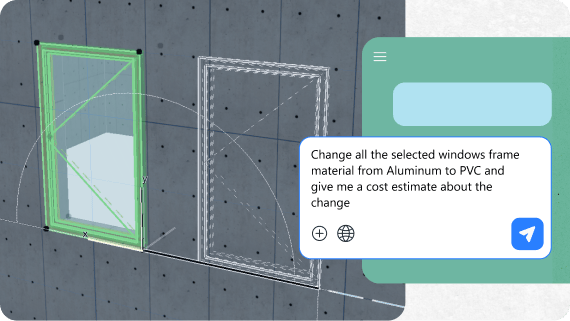
MCP-Unterstützung ist als Erweiterung geplant. Damit kann AI Assistant künftig direkt mit Ihrem aktuellen Projektmodell arbeiten, die Inhalte der Datei verstehen und Sie bei der Bearbeitung unterstützen – statt nur Antworten in Textform zu geben. Heute beschränkt sich KI in BIM-Tools oft auf Chat und Vorschläge; MCP ist unsere Antwort darauf und ermöglicht der KI einen kontrollierten Einblick in Modelldaten, Dokumentationsstrukturen und Projektstandards.
Werte
Modellintegrität und Qualitätsprüfungen
Wiederkehrende Modellprüfungen und QA-Aufgaben lassen sich automatisieren, ohne dass Architekt:innen die Kontrolle über den Prozess verlieren.
Datenextraktion
Nutzen Sie einfache Sprache, um Mengen, Beziehungen oder andere strukturierte Daten abzurufen, anstatt Skripte oder komplexe Abfragen zu erstellen.
Unterstützung für Standards und Vorlagen
Erhalten Sie Hilfe bei der Einhaltung von Bürostandards und Dokumentationsstrukturen über Projekte hinweg, wobei die KI innerhalb eines sicheren, kontrollierten Systems agiert.
ITERATIVE DESIGN-ENGINE Demnächst verfügbar
Die Iterative Design Engine ist unsere KI-gestützte Technologie zur Entwurfsfindung in frühen Projektphasen. Sie erzeugt automatisch verschiedene Volumen- und Layoutvarianten aus Ihrer Entwurfsabsicht – egal, ob Sie mit einer Skizze, einem Foto eines physischen Modells oder einem frühen Design Intelligence Platform Modell beginnen. In der Anfangsphase haben Sie den grössten Einfluss auf Kosten, Nachhaltigkeit und Funktionalität. Diese Technologie konzentriert sich darauf, Ihre Ziele und Rahmenbedingungen in eine breite Palette sinnvoller Optionen zu verwandeln, die Sie vergleichen können.
Werte
Von der Entwurfsidee zu den Optionen
Definieren Sie übergeordnete Ziele und Parameter wie Grundfläche, Höhe oder Abstände. Die Engine schlägt alternative Massenmodelle und Layouts vor, die diese Parameter berücksichtigen und gleichzeitig Ihr Entwurfskonzept beibehalten.
Schnellere Variantenprüfung
Prüfen Sie mehr Alternativen in kürzerer Zeit, um Zielkonflikte früher zu verstehen und fundiertere Entscheidungen zu treffen.
Mehr als digitales Skizzieren
Wir entwickeln die Iterative Design Engine weiter, damit Design Intelligence Platform mehr wird als ein digitales Skizzenbuch: ein interaktives Gegenüber für frühe Entwurfsphasen, mit dem Sie mehr Entwurfsvarianten untersuchen können – bei weniger repetitiver Modellierungsarbeit.
Nutzen Sie die Vorteile der KI-Lösungen
Entdecken Sie unsere Abonnements oder testen Sie sie mit einem unserer 30-tägigen Testangebote
Häufig gestellte Fragen
Zugang und Verfügbarkeit
Die Version des AI Assistant (BETA) ist enthalten in Archicad 29 (in den Archicad Collaborate und Archicad Studio-Abonnements), im MEP Designer Studio und in DDScad 21.
Funktionen und Einschränkungen
Der Assistent kann Elemente nur im Grundriss und in 3D-Ansichten selektieren. Zwar kann ein Schnitt oder eine Ansicht das aktive Fenster sein, wenn Sie eine Anfrage stellen, aber Sie können den Assistenten nicht auffordern, Elemente in dieser spezifischen Ansicht auszuwählen (z. B. „Selektiere die Wände in diesem Schnitt“). Die Auswahl wird immer auf das Gesamtmodell angewendet.
Nein, der Assistent unterstützt derzeit nur integrierte Archicad -Eigenschaften. Er kann keine benutzerdefinierten, vom Anwender erstellten Eigenschaften als Auswahlkriterien erkennen oder verwenden.
Für bestimmte Attribute wie Schraffuren und Linien benötigt das System eine interne Indexnummer anstelle des Namens, den Sie in der Benutzeroberfläche von Archicad sehen. Dies ist eine bekannte technische Einschränkung. Sie können zwar bereits einen Oberflächen-Namen auswählen , das gilt aber noch nicht für alle Attribute.
Konnektivität
Nein, für alle Funktionen des AI Assistant ist eine aktive Internetverbindung erforderlich .
Datenschutz und Datennutzung
Nein, der AI Assistant (BETA) sammelt und verarbeitet keine personenbezogenen Daten, die aus Nutzerinteraktionen entstehen. Es liegt jedoch in der Verantwortung der Nutzer, keine sensiblen Inhalte oder personenbezogenen Daten in Prompts hochzuladen oder einzufügen.
Nein, Graphisoft verwendet keine benutzergenerierten oder projektspezifischen Inhalte für das Training von KI-Modellen. Datensicherheit und Datenschutz sind zentrale Prioritäten für Graphisoft, wobei die Einhaltung von Branchenstandards den Schutz aller sensiblen Projektdaten sicherstellt. Diese Richtlinie wird durch die folgenden Massnahmen umgesetzt:
Es werden keine Projektdaten, Projektdateien, Dokumentationen oder generierte Bilder für Schulungszwecke verwendet.
Das Unternehmen erfasst lediglich Daten zur Softwarenutzung, wie etwa welche Funktionen wie oft verwendet werden, und erhebt keinerlei Daten, die mit spezifischen Projektinhalten in Verbindung gebracht werden könnten.
Dieser Prozess ermöglicht es Graphisoft, Feedback zu sammeln, die Leistung der Funktionen zu bewerten und Fehlfunktionen zu identifizieren. Die gesammelten Informationen helfen dabei, die Software zu verbessern und Lösungen für häufige Anwenderprobleme zu entwickeln, während gleichzeitig der Schutz der Privatsphäre und die Vertraulichkeit der Projekte gewahrt bleiben.
Roadmap
Ja. Kontinuierliche Verbesserung ist ein wichtiger Teil der Strategie von Graphisoft , wobei das Feedback der Nutzer:innen die laufende Entwicklung von Funktionen, KI-Modellen und die Markenintegration im gesamten Softwareportfolio beeinflusst.