 United States site instead?
Smart design tools for architects and engineers
Leave the repetitive, mundane work behind. Graphisoft’s AI Solutions help you stay focused on creative, high‑impact design while AI handles the rest.
AI Assistant Beta
The AI Assistant is built directly into Archicad and Graphisoft MEP Designer to help you learn faster, navigate documentation effortlessly, and interact with your model using natural language. Spend less time searching and more time designing.
Try it with ArchicadPlatforms:
Capabilities
Get answers to how-to questions about Archicad or MEP Designer tools, workflows, and architectural concepts- powered by official guides, support articles, and Graphisoft Learn content.
Inquire about selected building standards and regulations (starting with the UK), with more regions to come.
Select 2D and 3D elements in your Archicad model by describing what you need – for example, “select all exterior walls higher than 3 m with concrete structural material.”
Generate concept images directly from AI Assistant through a conversational, command line interface, then open those results in AI Visualizer 2.0 with all settings carried over for further refinement.
Create dedicated Spaces where you upload PDFs and chat with the assistant about project-specific documents to extract requirements, clarify constraints, or summarize content.
Benefits
Learn faster in context
Get trustworthy, step-by-step answers right where you work instead of switching between multiple help sources.
Design with more confidence
Check straightforward questions about supported standards and regulations early, reducing rework and surprises later.
Save time in large models
Let natural-language queries handle precise, criteria-based selections so you can focus on design decisions rather than manual element hunting.
Accelerate visual exploration
Create and refine visual concepts without leaving the conversational interface, then continue in AI Visualizer 2.0 without restarting your workflow.
Keep project knowledge close
Turn PDFs into a conversational knowledge base so your designs stay aligned with requirements, constraints, and client expectations.
Availability
Included in: Archicad 29 (Archicad Collaborate and Archicad Studio plans).
AI Visualizer
AI Visualizer 2.0 helps you turn sketches, models, and ideas into rich visual output directly from Archicad. You can generate images, textures, isolated objects, and high‑resolution visuals with simple prompts, so you can explore design directions and communicate concepts earlier in the process.
Try it with ArchicadPlatforms:
Capabilities
Turn a sketch, diagram, or model view into a rich visual by guiding AI with a simple text prompt while keeping your original layout.
Generate seamless, tileable textures and surface patterns from short descriptions that match the materials and mood you have in mind.
Archicad’s smart tools, including Stairs, Railings, and Curtain Walls, support creative, precise workflows—making complex projects easier to design.
Tap into Archicad’s versatile libraries and adaptive toolkit to meet any scale, style, or project need.
Select parts of a generated image and quickly replace or remove them using targeted prompts, without starting from scratch.
Boost image resolution by 4× to reveal finer detail and prepare visuals for print‑ready or client‑facing deliverables.
Benefits
Communicate ideas earlier
Turn rough sketches or simple model views into visuals that clients and colleagues can immediately understand.
Test materials quickly
Swap material and texture options without manual texture creation so you can focus on the overall design.
Speed up presentations
Enrich scenes and layouts with ready‑to‑use cutouts, reducing reliance on external asset libraries.
Explore multiple styles
Layer different stylistic directions on top of a fixed layout to compare options and agree on a clear direction with stakeholders.
Refine instead of restarting
Adjust only what needs to change in generated images, keeping what already works and saving time.
Present with confidence
Turn quick concept images into sharper, high‑resolution visuals suitable for client meetings and documentation.
MCP SUPPORT Coming soon
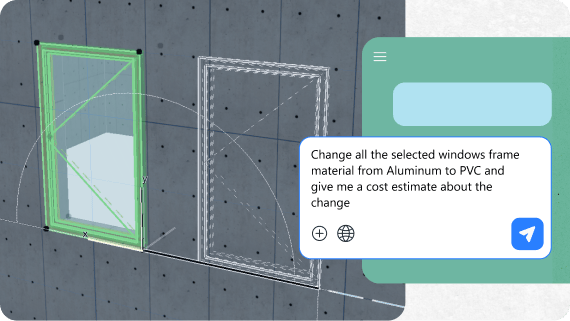
MCP Support is a planned improvement that will let AI Assistant work more directly with your live project model, understanding what is in the file and helping you act on it — not only answering in text. Today, AI in BIM tools is often limited to chat and suggestions; MCP is our answer, giving AI controlled visibility into model data, documentation structure, and project standards.
Values
Model health and quality checks
Automate routine model health reviews and quality assurance tasks while keeping architects in control.
Data extraction
Use simple language to pull quantities, relationships, or other structured data instead of building scripts or complex queries.
Standards and template support
Get help maintaining office standards and documentation structures across projects, with AI acting inside a safe, controlled framework.
ITERATIVE DESIGN ENGINE Coming soon
Iterative Design Engine is our AI‑driven exploration technology for early‑stage design, built to automatically generate multiple massing and layout options from your intent — whether you start from a sketch, a photo of a physical model, or an early Design Intelligence Platform model. In the early stages, you have the greatest influence on cost, sustainability, and usability; this technology focuses on turning your goals and constraints into a wide range of meaningful options you can compare.
Values
From intent to options
Define high‑level goals and limits such as floor area, height, or spacing, and let the engine propose alternative massing and layouts that respect those parameters while preserving your design concept.
Faster exploration
Explore more alternatives in less time, so you can understand trade‑offs earlier and make better‑informed decisions.
Beyond digital sketching
We are investing in Iterative Design Engine so that Design Intelligence Platform becomes more than a digital sketchpad, evolving into a true early‑stage design partner that helps you explore the design space with less repetitive modeling work.
Enjoy the benefits of AI Solutions
Explore our subscription plans or test them with one of our 30-day trial offers
Frequently Asked Questions
Access and availability
The AI Assistant (BETA) version is included in Archicad 29 (in Archicad Collaborate and Archicad Studio’s plans), MEP Designer Studio and DDScad 21.
Capabilities and limitations
The assistant can only perform selections in Floor Plan and 3D views. While a Section or Elevation can be the active window when you make a request, you cannot prompt the assistant to select elements on that specific view (e.g., “select walls on this section”). The selection will always be applied to the overall model.
No, the assistant currently only supports built-in Archicad properties. It cannot recognize or use custom, user-made properties for selection criteria.
For certain attributes like Fills and Lines, the system requires an internal index number instead of the name you see in Archicad’s interface. This is a known technical limitation. While you can select a Surface name, this does not yet apply to all attributes.
Connectivity
No, an active internet connection is required for all AI Assistant functions.
Privacy and data use
No, the AI Assistant (BETA) does not collect or process any personal data generated from user interactions. However, it remains the user’s responsibility not to upload or include sensitive content or personal data in prompts.
No, Graphisoft does not use any user-generated or
project-specific content for training AI models. Data
security and privacy are core priorities for Graphisoft,
with compliance to industry standards ensuring protection
for all sensitive project data. This policy is upheld
through the following practices:
No project data, project files, documentation, or generated
images are used for training purposes.
The company only collects software usage data, such as which
features are used and how often, and does not collect any
data that could be tied to specific project content.
This process allows Graphisoft to gather feedback, assess
feature performance, and identify malfunctions. The
collected information helps improve the software and develop
solutions for common user problems, all while protecting
user privacy and project confidentiality.
Roadmap
Yes. Continuous improvement is a key part of Graphisoft’s strategy, with feedback from users influencing ongoing development of features, AI models, and brand integration across their software portfolio.